Scan in CI with GitHub or GitLab
Last updated 7 November 2026
For engineers who set Spellwarden up in a pipeline. At the end you will have a GitHub workflow or a GitLab job that scans every pull or merge request, and you will know how to connect that pipeline to your organisation, so that its results reach the dashboard and your organisation's policy applies to it.
The scan is done by the open-source scanner, release 1.9.1, which the GitHub Action and the GitLab component run on your own runner. It checks the agent content of a repository: skills, plugin marketplaces, MCP server configurations, A2A agent cards, and Claude Code settings and hook files, against the 65 rules listed in Scanner rules.
Plans: Team and Enterprise (Repositories and connected CI, CI policy, CI connections); Enterprise (Registry check for pull and merge requests); Free (GitHub Action and GitLab component)
Two ways to run: local mode and connected mode
In local mode the Action or the component needs no account and no secret. It scans on the runner, reports in the pipeline and fails at the severity you choose. It is free, and it is what you get when you do nothing else than add it.
In connected mode the same step also talks to your Spellwarden organisation. The organisation's CI policy decides which rules apply, the results go to the Repositories page of the dashboard, and, on the Enterprise plan, the registry check fails a change that adds an item the private registry does not admit. Connected mode needs a Team plan, and a trial counts.
| What you need or get | Local mode | Connected mode |
|---|---|---|
| Account | None | A Spellwarden organisation on the Team or Enterprise plan |
| Credential | None | A CI connection (recommended) or a CI key |
| Rules | The baseline rules | The baseline rules plus the organisation rules or pack that CI policy names |
| Results | In the pipeline | In the pipeline and on the Repositories page |
| Registry check | No | Enterprise plan |
Start in local mode. Adding an organisation later changes only the inputs of the step, not the workflow around it.
Add the GitHub Action
The Action checks the agent content of the repository on every pull request. It reports findings as code scanning alerts, in one pull request comment that it keeps up to date and in the job summary, and it fails the check at the severity you choose.
- Add a workflow file under
.github/workflows, for examplespellwarden.yml, with the workflow below. - Replace
<sha>with the commit of a release tag of the Action, and the same for the checkout step. Pin by the commit of a release tag, never by a branch. The Action's version is the scanner's, and the release these pages were checked against is1.9.1. - Open a pull request. The job runs and the check shows its result.
on: [pull_request]
permissions:
  contents: read
  security-events: write   # code scanning alerts
  pull-requests: write     # the comment
jobs:
  spellwarden:
    runs-on: ubuntu-latest
    steps:
      - uses: actions/checkout@<sha>   # the defaults (depth 1, persisted credentials) let the scanner fetch the base commit
      - uses: spellwarden-ai/scan@<sha>  # v1.0.0
The workflow grants the permissions, and the Action never asks for more. A missing permission costs a feature, not the scan: the check result is always the scan's own result.
| Permission | For | When it is missing |
|---|---|---|
contents: read | Reading the checkout | The job cannot run |
security-events: write | Uploading the results to code scanning | A warning, and the check result does not change |
pull-requests: write | The pull request comment | A notice, and the check result does not change |
id-token: write | Connected mode through a CI connection | The scan falls back to the baseline rules with a notice, or fails when the repository requires connected mode |
The inputs you will use most are below. The Action's README lists the rest, and it stops with an error that names an input whose value it does not accept.
| Input | Default | Meaning |
|---|---|---|
path | . | The directory to scan |
fail-on | high | The lowest severity that fails the check: critical, high, medium, low or never |
locked | auto | Checks the lock file when it exists; true requires it, false skips it |
probe | false | Probes each remote MCP server in the configuration from the runner |
comment | true | Keeps one comment with the report on the pull request |
sarif-upload | true | Uploads the results to code scanning |
telemetry | true | False switches off the usage ping, one request per CI run with six fields and no file, finding or repository name |
The runner needs Python 3.11 or newer: GitHub-hosted runners have it, and elsewhere you add actions/setup-python before the Action. Linux, macOS and Windows runners work. The Action installs the scanner from the Python package index into its own virtual environment, checking every file against a pinned hash.
Add the GitLab component
The GitLab component scans every merge request and keeps a report of the default branch. It runs the scanner in its signed container image and reports findings in GitLab Code Quality, which works on every GitLab tier. Add it to .gitlab-ci.yml:
include:
  - component: gitlab.com/spellwarden-ai/scan/scan@1.9.1
The component adds two jobs to the test stage.
| Job | Runs on | Fails the pipeline on |
|---|---|---|
spellwarden-scan | Merge request pipelines | Findings at or above fail-on (exit 1), an incomplete scan (exit 2), a missing or stale lock file (exit 3) |
spellwarden-scan-default-branch | Default branch pipelines | An incomplete scan only (exit 2). Findings do not fail it, so the pipeline stays green and still records the report that merge requests are compared against |
Your project needs merge request pipelines: a workflow:rules entry for merge_request_event, or GitLab's own merge request pipelines template. The merge request job clones with GIT_DEPTH: "0" so that the merge base is available.
The inputs are the Action's, with GitLab's names for the same things: fail-on, path, locked, probe and telemetry, plus stage and report-expiry. The comment is off by default here, because GitLab's job token cannot write notes.
Pin the component by a full version such as 1.9.1, never by ~latest. On a self-managed GitLab, mirror the scanner image into your registry and set the image input to it, and mirror the component repository into your instance.
Code scanning alerts, the comment and failing at a severity
On GitHub: alerts, the comment and the summary
The Action uploads a SARIF file, so each finding is a code scanning alert on the pull request. It keeps one comment with the report up to date instead of adding a new one per push, and it writes the same report to the job summary. Both the upload and the comment are skipped with a notice when the workflow lacks the permission or the run has a read-only token, and the scan still counts.
On GitLab: Code Quality and the merge request note
GitLab shows Code Quality changes in a merge request by comparing the merge request's report with the report of the latest pipeline on the target branch. That is why the default branch job runs on every default branch pipeline. The first merge request after you add the component has nothing to compare against, so it shows no Code Quality changes, though the job still passes or fails on its findings. The jobs also keep the report as Markdown, JSON and SARIF artifacts.
To keep one note with the report on each merge request, set comment: true and store a project access token with the api scope as the masked CI/CD variable SPELLWARDEN_GITLAB_TOKEN. Without it the job prints a notice and the result does not change.
Failing at a chosen severity
The input fail-on sets the lowest severity that fails the check. It defaults to high, so a critical or high finding fails the pull or merge request. The value never reports findings without failing the check. Whatever you choose, the scan reports every finding it makes.
| Exit code | Meaning |
|---|---|
| 0 | Passed |
| 1 | Failed on findings at or above the chosen severity |
| 2 | Incomplete or invalid: an unreadable file, a broken configuration, a bad input, or a connected mode failure |
| 3 | The lock file is absent or out of date |
On a pull or merge request the scanner reads the settings file and the baseline from the commit the request targets, never from the request itself. Otherwise a request could add a risky server together with a setting that excludes it, or accept its own finding, and pass its own check. To accept a finding that a request introduces, merge the baseline entry first, in a request of its own. The baseline file section of the scanner guide explains the entries.
Connect CI to your organisation: CI connections and CI keys
A CI connection tells Spellwarden which code host owner may act for your organisation. The pipeline then proves who it is with the signed identity token its code host issues, and no secret is stored in the repository. An owner or a manager adds connections, on the Team or the Enterprise plan.
Add a CI connection
- In the dashboard, open Settings, then CI connections, and choose Add a connection.
- Choose the kind of host from the table below.
- Enter the owner: the user or organisation name on GitHub, or the path of the top-level group on GitLab together with the group's numeric ID, which GitLab shows on the group's overview page.
- Optionally narrow the connection to named repositories, one repository or group path per line, such as acme/tools. Left empty, every repository of the owner is allowed.
- Save it. The page shows the audience that tokens must carry and a snippet for each code host.
| Kind of host | What you enter | Token shape |
|---|---|---|
| github.com | The owner name | Known |
| github.com with an enterprise issuer | The owner name and the enterprise slug | Checked on the first token |
| GitHub Enterprise Cloud with data residency | The owner name and the data residency subdomain | Checked on the first token |
| GitHub Enterprise Server | The owner name and the host | Checked on the first token |
| gitlab.com | The top-level group path and its numeric ID | Known |
| GitLab self-managed | The group path, its numeric ID and the instance URL | Checked on the first token |
A host kind whose tokens Spellwarden has not seen yet shows Waiting for a first token. The first pipeline that connects is checked, and if its token does not have the expected shape it is refused and the reason appears on the connections page.
Then give the step your organisation's slug, the part of the dashboard address after dash.spellwarden.ai/, as the org input. On GitHub the job also needs id-token: write. The scanner asks the code host for a token whose audience is https://dash.spellwarden.ai/ci/<slug> and exchanges it once for a 15-minute CI token, which it uses for the policy, the registry check and the upload. The identity token is verified and not stored. Connected mode needs the Action at v1.2.0 or later, or the component at 1.2.0 or later.
on: [push, pull_request]
permissions:
  contents: read
  id-token: write          # the OIDC token of the CI connection
  pull-requests: write     # the comment
jobs:
  spellwarden:
    runs-on: ubuntu-latest
    steps:
      - uses: actions/checkout@<sha>
        with:
          fetch-depth: 0   # recommended, see below
      - uses: spellwarden-ai/scan@<sha>  # v1.5.0
        with:
          org: acme
On GitLab the component takes the same input and declares the ID token in each job it adds, so no secret is stored in the project. This needs GitLab 15.7 or later. Pass the slug as the input, not as a variable: the token's audience is built from the input.
include:
  - component: gitlab.com/spellwarden-ai/scan/scan@1.9.1
    inputs:
      org: acme
Changing the slug of your organisation changes the audience that every pipeline uses, so update the org input of every pipeline after a change.
GitLab projects in a subgroup
A project directly in the connected group matches by the group's ID. A project in a subgroup carries only its own subgroup's ID, which proves nothing about the top-level group, so Spellwarden never authorises it by name alone. The first pipeline of such a project is refused and the project is listed under Projects waiting for approval on the connections page. An owner or a manager approves it there, and its pipelines then connect.
Private forges: pasted signing keys
By default Spellwarden fetches the signing keys of the code host from its discovery document. A GitHub Enterprise Server or a GitLab instance that is not reachable from the internet cannot be fetched, so you paste its public signing keys into the connection instead. GitHub Enterprise Server serves them at https://<host>/_services/token/.well-known/jwks and GitLab at <instance>/oauth/discovery/keys.
Pasted keys are never fetched, so your code host's rotation is yours to follow: paste the keys again after a rotation, because an exchange with an unknown key fails. Only public signing keys are accepted, and a key set that holds a private member is refused. The page shows when the keys were pasted and their key ids.
CI keys for systems without OIDC
A pipeline that cannot use a CI connection reports with a CI key. In Settings, then API keys, create a key with the access level CI, and store it as a secret. An organisation can hold up to 200 active CI keys. On GitHub pass it as the api-key input instead of org, and never both:
      - uses: spellwarden-ai/scan@<sha>  # v1.5.0
        with:
          api-key: ${{ secrets.SPELLWARDEN_API_KEY }}
On GitLab store it as the masked CI/CD variable SPELLWARDEN_API_KEY, which the component reads, and do not make it available to a project that also sets org. Other CI systems run the scanner with pipx run spellwarden==1.9.1 scan or the image ghcr.io/spellwarden-ai/spellwarden:1.9.1, with the key in that variable and, for the upload, a run id in SPELLWARDEN_RUN_ID. A key for read or write access is refused.
A key is weaker than a connection, and you should know what it does not give you:
- It is a secret that every workflow of the repository can read. A CI connection has none.
- Results uploaded with a key are shown as reported with a CI key. They are not attested by the code host, are not the repository's own state and do not count in the trust score.
- The first upload binds the repository to the key. After you revoke the old key, the next upload rebinds it.
What the dashboard shows
A repository appears on the Repositories page after a pipeline of yours reports a scan. The page lists each repository with its visibility, default branch, how it connects (a CI connection or a CI key), its open findings by severity, the result of its latest default branch scan and the date.
Open the Repositories page in the live demo
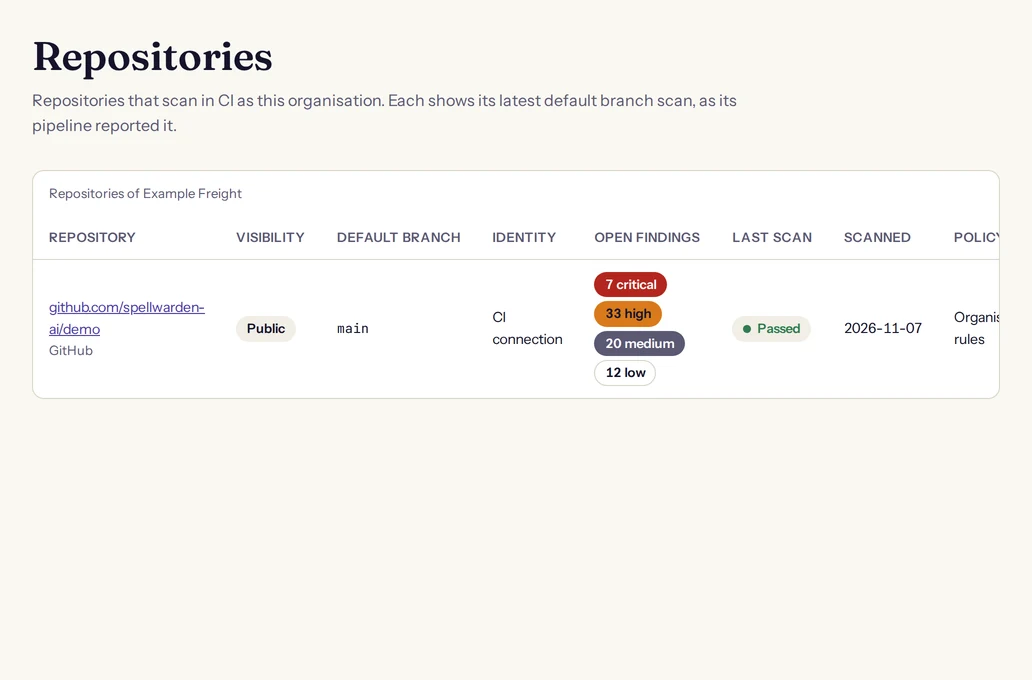
What the dashboard counts as a repository's state is narrow on purpose. Only a default branch scan that the code host's signed token attests is the repository's current state, and only that scan feeds its findings and the trust score. Pull and merge request scans of the last 30 days are listed on the repository's page, with the request number and the head commit as the pipeline reported them. A report made with a CI key is shown apart, as reported with a CI key.
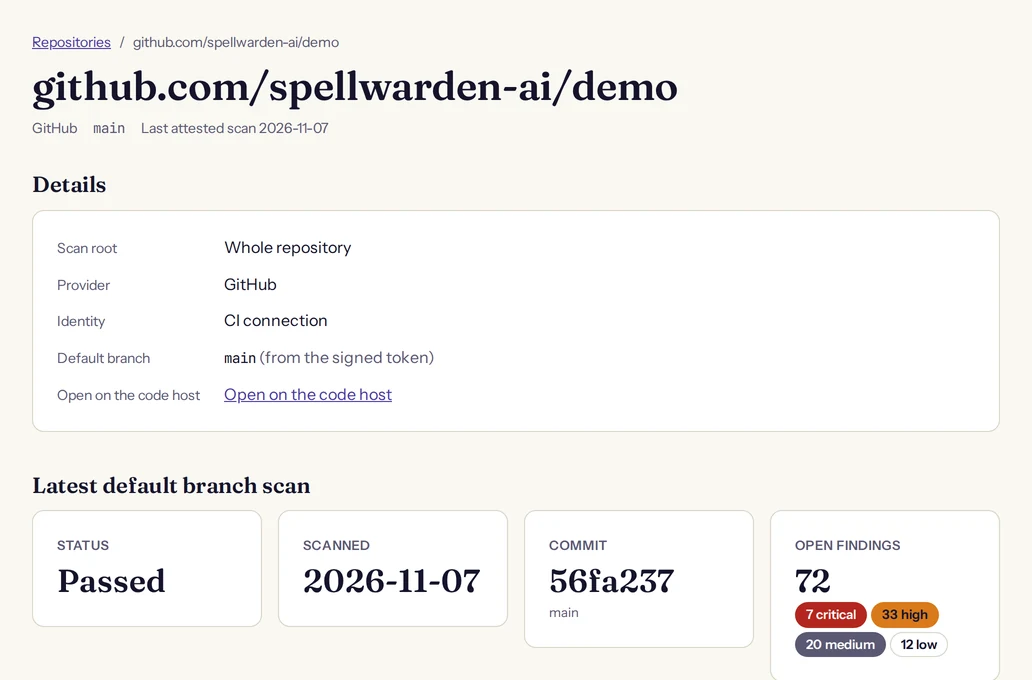
- A repository's default branch must be confirmed before its scans count. When the signed token does not settle it, the repository page says that default branch scans are waiting for confirmation and suggests the branch the pipeline reported. An owner, a manager or a member confirms it there.
- The default branch job on GitLab reports the repository's state when the default branch is protected, which is the GitLab default.
- Findings of a repository are read only in the dashboard. You accept one in the repository's own baseline file, in a change that goes through review.
- If a repository is deleted and created again on the code host, its new pipeline is refused until someone rebinds the repository on its page, so the new repository never inherits the findings of the old one.
- Removing a repository deletes its scans and findings. A pipeline that reports again adds it again.
CI policy
The CI policy is what pipelines apply when they scan as your organisation. Owners and managers set it on the CI policy page, which is in the main menu. The baseline rules always run. The policy decides which organisation rules join them, and how the registry check runs.
Open the CI policy page in the live demo
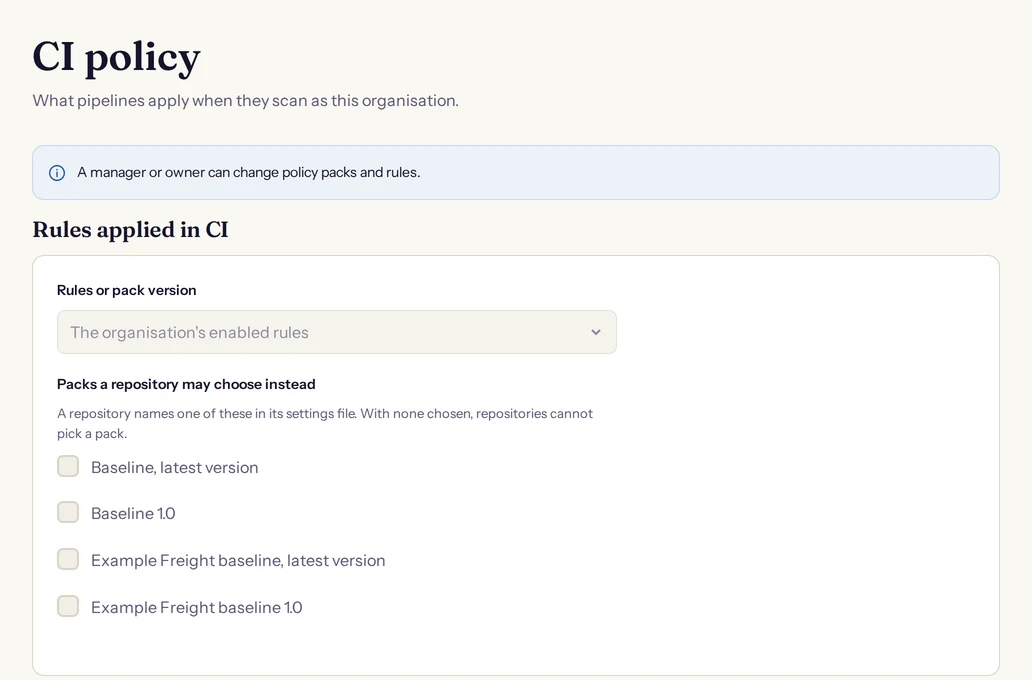
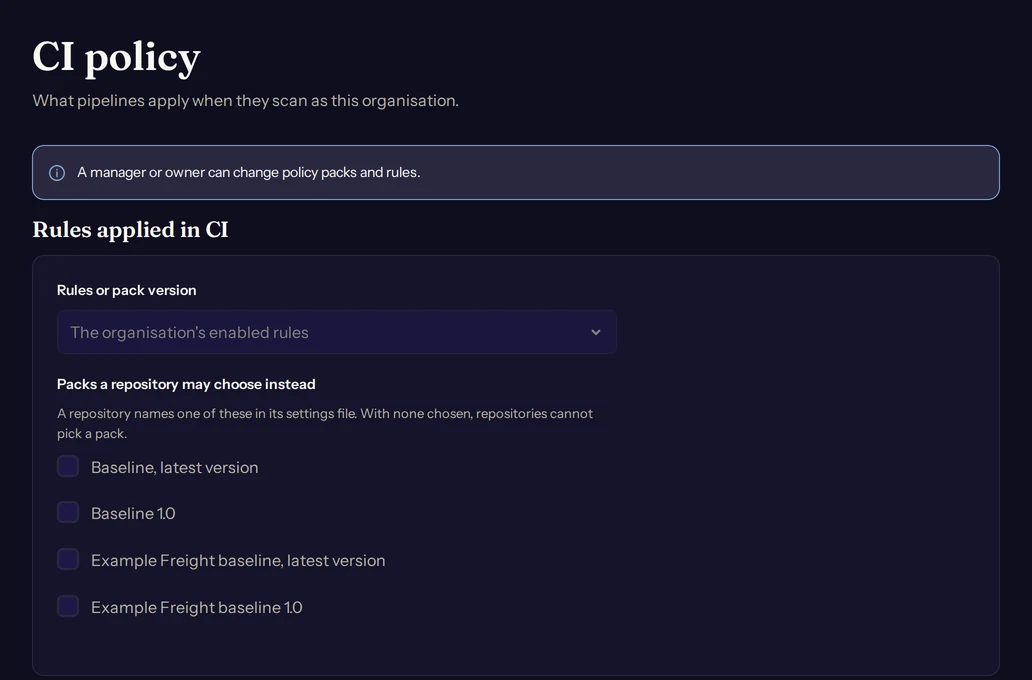
- Rules or pack version is either the organisation's enabled rules, or one of your policy packs, at its latest version or at a published version. A pack carries its organisation rules as full copies, so a published version keeps its meaning.
- Packs a repository may choose instead lists the packs that a repository may name in its own settings file. With none chosen, repositories cannot pick a pack.
- The registry check has its own section: a switch for the check, a choice between judging only what a request adds or changes and judging everything in the repository, and switches for judging stdio servers and for judging plugins and marketplaces. It is part of the Enterprise plan, and without it pipelines skip the check.
A repository names its pack in .spellwarden/config.yml. The same connected mapping holds the choice to upload and the choice to require connected mode:
# .spellwarden/config.yml
connected:
  pack: 3f2a0c9d4b7e4d1f8a6b5c2e9d0f1a37@1.4   # optional: a pack id (baseline or 32 hex), optionally @version, from the organisation's allowed list
  upload: true                                  # optional, default true: upload the results in CI
  required: false                               # optional, default false: a run that cannot connect exits 2 instead of falling back to free mode
A pack that the policy does not list for repositories is refused with the error policy_not_found. On a pull or merge request the scanner reads the pack and required settings from the base commit, so a request cannot weaken connected mode by editing them.
With required: true, a run that cannot connect exits with an error instead of falling back to the baseline rules. Use it for a repository that must not be scanned without your organisation's policy. Every scanner before 1.2.0 refuses the connected key, so requiring connected mode presupposes 1.2.0 everywhere the repository is scanned. Rules that your scanner version is too old to run are left out of the run with a notice, and the dashboard marks that scan incomplete.
Rules, packs and exports are explained in Rules, policy packs and exports, and organisation rules in particular in organisation rules.
The registry check for pull and merge requests
On the Enterprise plan, the registry check compares what a pull or merge request adds with your private registry. Anything the registry does not admit becomes a high finding, with a link in the report to request its admission. The check runs in connected mode when the CI policy has it on, which is the default.
| Item | How it is identified | Finding when not admitted |
|---|---|---|
| A skill package | The hash of its files | SW-REG-001 |
| A plugin or a marketplace | Its repository URL at a full commit | SW-REG-001 |
| A remote MCP server | The hash of its normalised address | SW-REG-002 |
| A stdio MCP server | The pinned form of the command that launches it | SW-REG-002 |
| Any item that cannot be identified | Not identified: see the reasons under troubleshooting | SW-REG-003 |
The three rules, SW-REG-001, SW-REG-002, SW-REG-003, are all high and are reported only by a connected run. SW-REG-001 covers a skill, plugin or marketplace that is not admitted and SW-REG-002 a server. SW-REG-003 covers an item the registry cannot judge, because it cannot be identified, so nothing is sent for it.
On a pull or merge request with the default scope, the check judges what the request adds or changes: a skill when a file under it changed, a server or stdio entry when its configuration document changed and the base version holds no entry with the same identity, a plugin or marketplace in the same way. When the base cannot be read, every item is in scope. Default branch runs judge everything. Use a full history, fetch-depth: 0 on GitHub, so that the base is available.
An item that is in scope and not admitted is a finding at its location. Skills and remote servers are admitted through the registry's own scans. Stdio servers, plugins and marketplaces are admitted by an allow entry that an administrator adds, as allow entries describes. For a stdio server, a plugin or a marketplace, the link in the report opens the allow dialog, filled in, for a registry administrator. Anyone else sees the item described in words and is told to ask a registry administrator.
You can accept an SW-REG finding in the baseline for at most 90 days, and on a request only the base commit's baseline is read for them. If the check itself cannot be made, the run exits 2 with the error registry_check_failed and writes no finding, so an outage is never a pass.
Pull requests from forks: the two-job recipe
GitHub gives a pull request from a fork no secrets and no identity token, so that run cannot connect. It falls back to the baseline rules, or fails when the repository requires connected mode. To scan outside contributions with your organisation's policy, use two jobs, so that each request is scanned once, by the job that has a credential.
- The
pull_requestjob scans requests from the same repository. - The
pull_request_targetjob runs with the base repository's secrets and token. It checks out the head commit without persisted credentials, runs nothing but the Spellwarden Action, and grants only the permissions below.
on:
  pull_request:
  pull_request_target:
jobs:
  same-repository:
    if: github.event_name == 'pull_request' && github.event.pull_request.head.repo.full_name == github.repository
    runs-on: ubuntu-latest
    permissions:
      contents: read
      id-token: write
      pull-requests: write
    steps:
      - uses: actions/checkout@<sha>
        with:
          fetch-depth: 0
      - uses: spellwarden-ai/scan@<sha>  # v1.5.0
        with:
          org: acme
  outside-contribution:
    if: github.event_name == 'pull_request_target' && github.event.pull_request.head.repo.full_name != github.repository
    runs-on: ubuntu-latest
    permissions:
      contents: read
      id-token: write
      pull-requests: write
    steps:
      - uses: actions/checkout@<sha>
        with:
          ref: ${{ github.event.pull_request.head.sha }}
          persist-credentials: false
      - uses: spellwarden-ai/scan@<sha>  # v1.5.0
        with:
          org: acme
Do not add other steps to the second job: they would run with the base repository's secrets next to code written by the author of the request. Outside this recipe, never run the Action under pull_request_target with the request's code checked out. The scanner treats pull_request_target as a request of the base repository, never as a fork run, so it connects, checks and uploads.
Dependabot pull requests run in the first job. One whose diff puts nothing the registry check would judge in scope runs in free mode with a notice, so routine dependency updates do not need the second job.
On GitLab, a merge request from a fork whose pipeline runs in the fork's project carries the fork's identity, which no connection names unless it lists the fork, so the scan falls back to the baseline rules or fails when connected mode is required. A pipeline that runs in the parent project for a fork's merge request is not supported: the scanner refuses its token with the error fork_pipeline_unsupported.
Troubleshooting
The reasons the registry check cannot identify an item
Each reason is named in the finding that the check reports for an item it cannot identify (SW-REG-003). The registry can admit only what it can pin, so each fix makes the item identifiable.
| Reason | What it means | What to do |
|---|---|---|
unhashable | A skill's files cannot be hashed the way the registry hashes an archive of it: a dependency directory such as node_modules or a virtual environment is under it, an include or exclude setting drops a file, a link could not be followed, or a file has the git attribute export-ignore or export-subst | Remove the directory or the attribute and keep every file of the skill in the scan, or accept the finding in the baseline |
unresolved | An address or command holds a reference such as ${VAR}, or cannot be read, or an option before the package is not one the launcher is known to take | Write the value out, or remove the option |
insecure | The server's address starts with http://, which is also the configuration rule SW-CFG-001 | Use https:// |
unpinned | A package is a range, a tag, latest or has no version, or a plugin or marketplace is not pinned to a full commit | Pin an exact version, a full commit or an image digest |
unknown launcher | The command is not a recognised launcher, such as a path to a program | Launch the server through a pinned npx, uvx or docker run form |
launch override | The launch changes what the launcher runs or where it fetches from, by an option such as docker run --entrypoint or an environment entry that redirects a launcher | Remove it from the launch |
resolver override | A file of the repository, such as .npmrc, uv.toml or pip.conf, redirects package resolution for the launcher | Remove the redirect, or accept the finding in the baseline. A change to a resolver file is a new finding |
Token and connection errors
A connected error exits 2. Before Spellwarden has answered once, a run that cannot connect falls back to the baseline rules with a notice, unless the repository requires connected mode. After the first answer every failure exits 2, except a failed upload, which is only a notice. The error codes you will meet first:
| Error | What to do |
|---|---|
connected_no_credential | This job has no identity token. Grant id-token: write on GitHub, make sure the component's ID token reaches the job on GitLab, or use a CI key. A pull request from a fork has none by design. |
connected_auth | The organisation did not accept this pipeline's identity. Check the CI connection under Settings, CI connections, its owner and its repositories, and the CI key secret. The message carries the reason. |
connected_config | The organisation slug and a CI key are both set, the slug is not a slug, or the scan root's path has characters that cannot be a scan root. Set one credential and fix the slug. |
connected_key_invalid | The key is not a CI key. Create one under Settings, API keys, with the access level CI. |
connected_subscription | The organisation's subscription is not active. Machine access is paused until billing is restored; people can still sign in. |
connected_rate_limited | A Spellwarden limit stopped the call. Wait for the time the message names and run again. |
connected_unavailable | The service could not be reached or answered with an error. Run again. |
connected_required | The repository requires connected mode and the run could not connect. Fix what the detail names, or set required to false. |
The CI connections page shows the last problem it saw for each connection: an unknown signing key, signing keys that could not be fetched, signing keys that cannot be used, a host that is not reachable from the internet, or a token that did not have the expected shape. The first fix is almost always to paste the current signing keys again.
A package's identity is a hash over its bytes, so a checkout that rewrites line endings, such as the Windows core.autocrlf setting, produces a different package from the one the registry admitted. Check the repository out without line-ending conversion.
Only a few things leave the runner in connected mode: the token request to your code host, the exchange, the policy request, the registry check and the upload. No whole file is sent. A finding carries an excerpt of at most 300 characters of the matched line, with credentials masked, and a server address leaves only as a hash.